

How to Use Snow Mode in the Nissan Rogue Rock Creek
Minnesota winters can bring everything from light snow to icy roads and heavy accumulation. If you drive a Nissan Rogue Rock Creek, you have a feature designed to help make snowy and frozen roads easier to navigate: Snow Mode.
Available with the Rogue’s Intelligent All-Wheel Drive system, Snow Mode is one of several selectable drive modes designed to help the Rogue adapt to different road conditions. For drivers in Coon Rapids and throughout Minnesota, knowing how to use Snow Mode can be a helpful part of preparing for winter driving.
Here’s a simple guide to using Snow Mode in the Nissan Rogue Rock Creek.
What Is Snow Mode in the Nissan Rogue Rock Creek?
Snow Mode is a drive mode designed to help aid driving on snowy and frozen roads.
The 2026 Nissan Rogue offers available Intelligent All-Wheel Drive with multiple drive modes, including Auto, Eco, Sport, Snow and Off-Road. Nissan’s Intelligent All-Wheel Drive system can adjust power between the front and rear wheels to help provide traction when needed.
In the Rogue Rock Creek, this capability fits naturally with the SUV’s more adventure-focused design. The Rock Creek features Intelligent All-Wheel Drive, all-terrain tires, and selectable drive modes that can help you transition from everyday pavement to more challenging surfaces.
How to Turn On Snow Mode in the Nissan Rogue
Using Snow Mode is simple once you know where to find the drive mode selector.
1. Start the Rogue
Start your Nissan Rogue Rock Creek as you normally would.
2. Find the Drive Mode Selector
Look for the Drive Mode Selector in the center console.
This dial allows you to select different drive modes depending on your driving conditions.
3. Turn the Dial to Snow
Rotate the Drive Mode Selector until Snow Mode is selected.
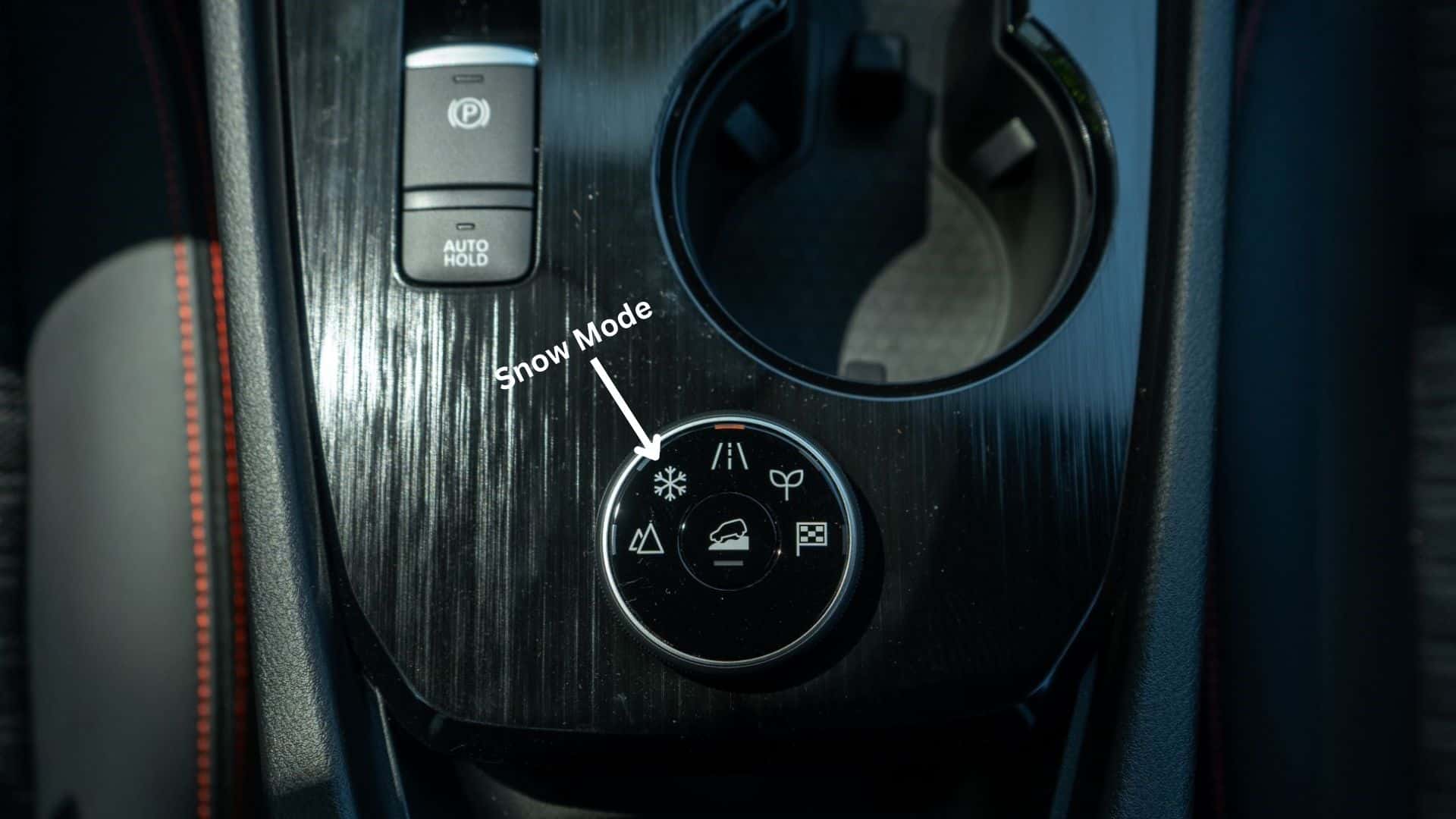
You’ll see the Snow Mode indicator appear in the vehicle information display. (The snowflake symbol makes it easy to recognize the setting.)
4. Drive Smoothly
Once Snow Mode is selected, continue driving with smooth inputs. Remember that Snow Mode is designed to assist with traction and vehicle control in snowy and frozen conditions. It does not eliminate the need for careful winter driving.
Avoid sudden acceleration, hard braking and abrupt steering whenever road conditions are slippery.
When Should You Use Snow Mode?
Snow Mode is most useful when you’re dealing with snow-covered or frozen roads.
For normal dry pavement, Auto Mode is generally the appropriate everyday setting. Snow Mode is designed specifically for snowy and frozen road conditions.
Snow Mode vs. Auto Mode: What’s the Difference?
If you’re wondering whether you should leave your Rogue in Snow Mode all winter, the answer is not necessarily.
Auto Mode is designed for normal everyday driving and is the Rogue’s default drive mode.
Snow Mode is specifically intended to help aid driving on snowy and frozen roads.
You can switch between the available modes using the Drive Mode Selector as conditions change.
Does Snow Mode Mean the Rogue Can’t Slip?
No. This is an important distinction. Snow Mode and Intelligent All-Wheel Drive can help the Rogue respond to slippery conditions, but no drive mode can completely eliminate the risks associated with winter weather.
Your tires, speed, following distance, braking habits and road conditions all play important roles in winter driving.
Even with Snow Mode engaged, it’s important to:
- Reduce your speed when conditions require it
- Leave additional following distance
- Brake gradually
- Accelerate smoothly
- Make gentle steering inputs
- Watch for ice underneath or beneath freshly fallen snow
- Give snowplows and other vehicles plenty of room
Why Snow Mode Is Helpful for Minnesota Drivers
For drivers around Coon Rapids, Blaine, Anoka and the greater Twin Cities area, winter weather can change quickly. One minute you may be driving on clear pavement, and the next you could encounter snow-covered side streets, packed snow or slippery intersections.
That’s where having selectable drive modes can be especially useful.
Snow Mode Isn’t the Same as Off-Road Mode
The Rogue Rock Creek has multiple drive modes, but they aren’t all designed for the same conditions.
Snow Mode is intended for snowy roads. Off-Road Mode is intended for surfaces and situations such as uneven dirt roads, steep uphill surfaces and other off-road conditions.
So if you’re driving through a Minnesota snowstorm on paved roads, Snow Mode is the setting to consider. If you’re heading onto an appropriate off-road surface, that’s where Off-Road Mode can come into play.
Does the Rogue Rock Creek Have All-Wheel Drive?
Yes. The 2026 Nissan Rogue Rock Creek is offered with Intelligent All-Wheel Drive, along with selectable Snow and Off-Road modes. Nissan lists the Rock Creek with AWD and Eco, Sport, Snow and Off-Road drive modes.
That combination makes the Rogue Rock Creek an appealing option for drivers who want an SUV that can handle everyday commuting while also being prepared for changing road conditions and weekend adventures.
Get Ready for Winter in a Nissan Rogue Rock Creek
Snow Mode is one of those Rogue features that can be easy to overlook until you actually need it.
The next time a Minnesota snowstorm rolls through, remember:
1. Start your Rogue.
2. Find the Drive Mode Selector.
3. Turn the dial to Snow Mode.
4. Confirm Snow Mode appears on the vehicle information display.
5. Drive smoothly and adjust your speed for the conditions.
It’s a simple feature, but knowing how to use it can help you feel more prepared when winter weather arrives.
See the Nissan Rogue Rock Creek at Walser Nissan Coon Rapids
Want to see how the Nissan Rogue Rock Creek handles its different drive modes and explore its available AWD capability? Visit Walser Nissan Coon Rapids to check out the Rogue Rock Creek and learn more about its features.
Our team can walk you through the Drive Mode Selector, Snow Mode, Off-Road Mode and other Rogue features so you know how to get the most out of your SUV before winter arrives.
Visit Walser Nissan Coon Rapids to explore the Nissan Rogue Rock Creek today.
0 comment(s) so far on How to Use Snow Mode in the Nissan Rogue Rock Creek